




In this month’s newsletter, we have several items to share with you:
- Now available (recording): What’s new in Microsoft Teams and updates from Microsoft’s Inspire Partner event
- How SMBs Can Do More with Less through Technology and the Right Partner
- How to Securely Collaborate with External Parties using Microsoft Teams
- Best Practices for Sharing Data and Collaborating with External Parties in Microsoft Teams

WEBINAR RECORDING: What’s new in Microsoft Teams and updates from Microsoft’s Inspire Partner event
The Point Alliance team shares learnings from Microsoft’s flagship partner event, Microsoft Inspire. Hear the latest information and innovations that Microsoft is building for Microsoft 365.
How SMBs Can Do More with Less Through Technology and the Right Partner
Small and mid-sized businesses (SMBs) have the constant challenge of doing more with less, and in the face of economic headwinds and hiring obstacles, this reality is ever-more pertinent. McKinsey found that 37% of SMB owners cite inflation as their biggest challenge— “the highest percentage in 40 years.” And talent is projected to slow as the Great Attrition rears its head.
Despite these obstacles, SMBs continue to grow and balance cash flow with hiring—primarily using technology to automate manual work and offload tasks from humans. But how do you know which technology solution is right for your business, and how do you get the most out of it once you’ve made your choice?
Here we explain why Microsoft 365 is the prime option for SMBs looking to do more with less—and how the right partner can help you maximize your investment in it.
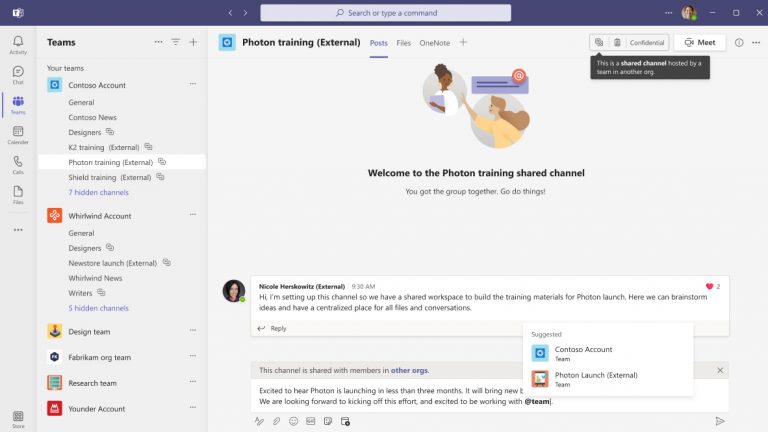
How to Securely Collaborate with External Parties Using Microsoft Teams
You’ve likely heard of the immense benefits of using Microsoft Teams to improve internal collaboration and communication in a business, but it’s a powerful solution for doing the same with external parties.
External collaboration is essential for any business today, but when you have an all-in-one platform for internal videoconferencing, messaging, file sharing, and more, bottlenecks can occur when you have to go outside that platform to connect with third parties. You need the same, streamlined capabilities you have internally as you’re working with suppliers, vendors, consultants, and anyone external you do business with. Microsoft Teams delivers such functionality with shared channels, guest access, and external access.
Best Practices for Sharing Data and Collaborating with External Parties in Microsoft Teams
Microsoft Teams is known for its powerful collaboration and communication tools and features—boosting internal operations for companies of all sizes. But businesses use Microsoft Teams for external collaboration as well as because the platform offers secure access methods. There are a few ways to leverage these tools to invite guests or work over a shared channel—check out our blog to learn all about them—but there are also some best practices to implement if you’re exploring external sharing in general.





