



Microsoft 365 is an immensely powerful business tool—one that can transform the way you operate and have a real impact on your revenue. But to know how to use all of its components, how to fit it to your business (and not the other way around), or even to be assured of your security, you need a partner.
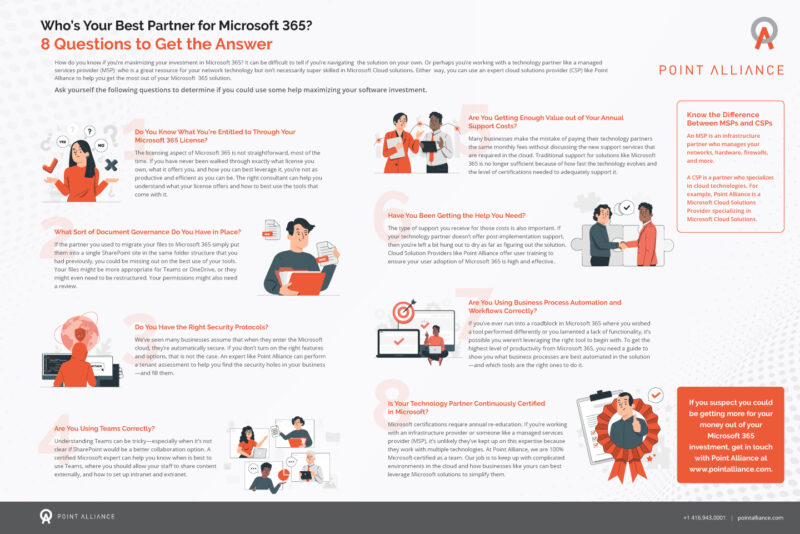
Most businesses don’t have the time to sit down and sift through what they’re entitled to with a license or explore document governance. You just want to get up and running. That’s where a cloud solutions provider (CSP) comes in. We created a checklist to help you figure out what type of partner is best to enable you to maximize your Microsoft 365 solution. It walks you through:
The difference between a CSP and an MSP (managed services provider)
Not all partners are created equal. Managed services providers are great at supporting your network technology needs, but they don’t often know Microsoft Cloud. CSPs specialize in cloud technologies, and some like Point Alliance go so far as to make Microsoft their sole focus. This level of expertise is what will truly help you get the most ROI from your solution.
How to figure out what you’re entitled to with your 365 license
If you’re a bit in the dark about what exactly your license comes with and how to get the best use of what it offers, you’re not maximizing your productivity with Microsoft 365. CSPs make it their business to know all the ins and outs of Microsoft’s licensing aspects to help you make sure you’re getting your money’s worth.
Dealing with document governance and security
There are several ways to do document governance in Microsoft 365, and usually plopping your files into SharePoint isn’t the best one. (Although just using SharePoint can be the answer, depending on your business!) This is where the expertise of a CSP is crucial. They’ll help you understand what tools in your solution are the right ones for managing your documents.
You can also use a CSP to make sure your security protocols are all set in the Microsoft cloud. (It’s not automatic.)
Using Teams and business process automation correctly
If you’re like many a small business, time is money, and figuring out all the bells and whistles on Microsoft Teams likely falls to the bottom of the to-do list. But Teams is a powerful tool that can take your organization’s collaborative abilities to new levels of efficiency. A CSP can help you apply Teams in the most effective way.
Business process automation (BPA) is also a fundamental component of Microsoft 365, but it’s difficult to inherently know which processes you should automate in your solution. A CSP will guide you.
Getting the most out of your support
The rate of technology’s evolution today is so rapid, many technology partners can’t keep up with it all. That’s why many have branched off to specialize in categories like networking (e.g., MSPs) or cloud solutions (CSPs). Microsoft’s evolution is no different, making traditional support for its solutions inadequate if you want to keep up with all the upgrades and capabilities. A specialized expert should keep up with their Microsoft certifications so they can always provide the most insightful help.
They should also offer post-implementation support, user training, and other services to make sure your solution adoption goes smoothly for the long term.
Maximize your Microsoft 365 with Point Alliance
Want to get more for your money? Get in touch with Point Alliance today. We are a 100% Microsoft-certified CSP, and we’d love to answer any questions.





