



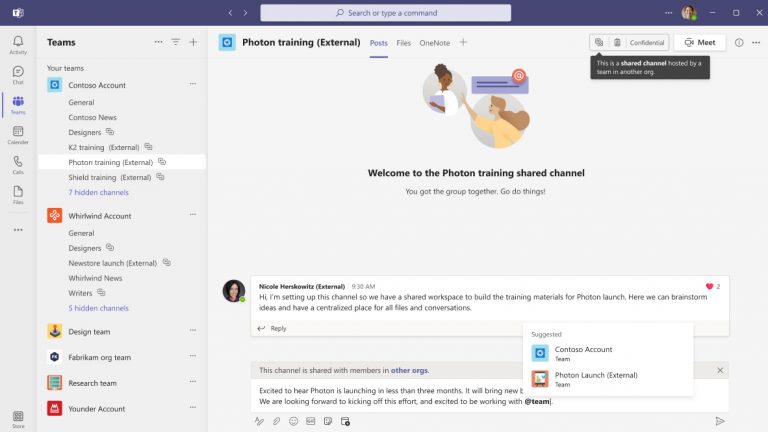
You’ve likely heard of the immense benefits of using Microsoft Teams to improve internal collaboration and communication in a business, but it’s a powerful solution for doing the same with external parties.
External collaboration is essential for any business today, but when you have an all-in-one platform for internal videoconferencing, messaging, file sharing, and more, bottlenecks can occur when you have to go outside that platform to connect with third parties. You need the same, streamlined capabilities you have internally as you’re working with suppliers, vendors, consultants, and anyone external you do business with. Microsoft Teams delivers such functionality with shared channels, guest access, and external access.
Shared Channels
Microsoft offers Teams Connect shared channels give Teams users and external participants the ability to securely collaborate in a shared workspace. You can invite third parties and only the users who are owners or members of the shared channel have access to it. Shared channels are distinct from standard channels and private channels in a few ways:
- People can be added to a shared channel without being added to a team
- A channel can be shared directly with other teams or its parent team
- External participants through B2B Direct Connect can participate in the channel
You can enable shared channels with all the external organizations you communicate with or just configure B2B Direct Connect for a select number of organizations. Shared channels are ideal for collaborating with guests from another organization on a large project.
Guest Access
Guest access is distinct from shared channels in that you are not adding members to a channel but rather adding users as guests to your organization’s Azure Active Directory. These users then have “broad access to organization data and applications beyond Teams channels” according to Microsoft. They can have access to private channels so long as they’ve been invited, and they have access to all standard channels in the team. The same compliance and auditing protection of other Microsoft 365 users is applied to guests.
If you have an external party through which your guests change frequently, you can use entitlement management tools in Azure Active Directory to simplify managing these guests’ identities.
External Access
Teams users can communicate with people in external organizations who also permit external access in Teams. Users don’t need to switch among organizations when communicating through external access in teams because users see notifications and chats inside the Teams client. Just like how guests are labeled with “(Guest)”, external users are labeled with “(External)” signifying they’ve allowed external access. There are multiple ways to manage external access to ensure secure collaboration and identity verification.
Still Concerned About Security?
Microsoft enables additional safeguards to prevent inappropriate data sharing or other breaches as you interact with external parties. The company offers several best practices for sharing with unauthenticated users, including setting link permissions, adding copyright information to your files, and setting expiration dates for Anyone links.
It also offers advice and tips on how to create a secure guest-sharing environment, including setting up multi-factor authentication for guests, setting up guest access reviews, and configuring a session timeout policy so guests have to authenticate on a daily basis.
Boost Collaboration and Communication with External Parties in Microsoft Teams
Your vendors, suppliers, and other relationships expect modern communication tools that deliver seamless digital experiences. Even small businesses can deliver on that expectation with Microsoft Teams. At Point Alliance, we help small and mid-sized business specifically take advantage of the power of Teams to improve internal and external collaboration. If you have questions about how Teams can transform your collaboration capabilities, reach out to our experts anytime.





