




Our latest presentation of Solutions for Success involves an overview of Microsoft Purview, which provides a unified data governance solution to help manage and govern your on-premises, multi-cloud, and software-as-a-service (SaaS) environments. It can include both on-premise servers, endpoints, desktops, and other SaaS clouds. It can also be connected to Google, Dropbox, Workday, Salesforce, and more.
Microsoft Purview provides holistic reporting and mapping of your data estate so you have a better idea of your landscape. As Microsoft Purview provides a lot of data, there is work to be done in terms of aligning with the business to plan and providing the right data to the right user at the right time.
There are some licensing implications with the solution, now called Microsoft Purview. If you are running an E5 license, then you have the licensing that you need already. If you are using any of the lower licenses, there is an additional Information Protection and Governance License that can be added on.
What Can You Do with Microsoft Purview?
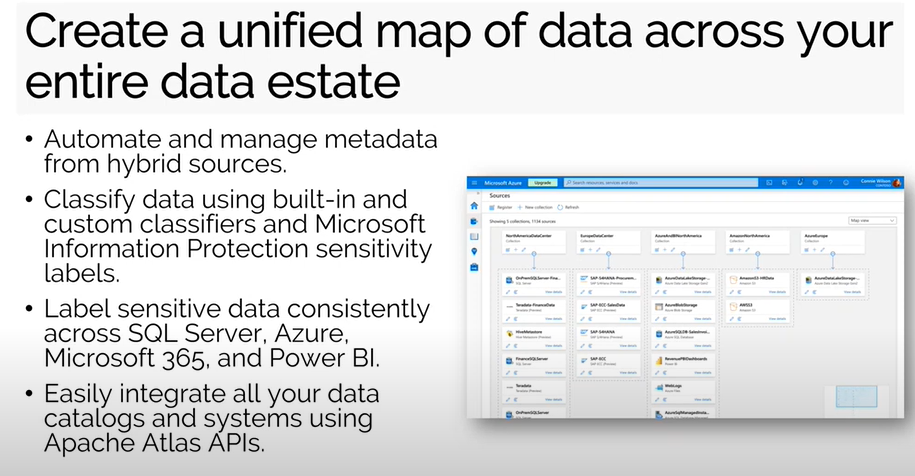
With Microsoft Purview, you can create a unified map across your entire data estate—covering more than just the Microsoft 365 tenant. The information in your Microsoft 365 tenant is driven—in most cases—by sensitivity labels and policies. Out of the box, there are three sensitivity labels you can turn on or off depending on lines of business and more. The data can be in the form of a file, an email, or a piece of content, but the most important consideration is whether or not you are encrypting it. Or are you securing it differently?
From a data governance perspective, it comes down to:
- How are you tracking this information?
- What are users doing with the data?
- If they are sharing data, what should you do to prompt or block the activity?
With Microsoft Purview, you can track, monitor, or block the data from being shared, or you can use a tooltip to alert the user that may be sharing sensitive information, such as:
- Credit card numbers
- Passports numbers
- Social security numbers
- Bank account details
- Driver’s license numbers
This type of insight can be made available via Azure SQL with Power BI, and then you can extend role-based reports to business users without having to provide admin access to the data.
Making Data Easily Discoverable Using Keywords and Familiar Business Terms
Microsoft’s powerful search capability has been built into Microsoft 365 which can help administrators find information based on sensitivity labels and tags. Administrators need to think through:
- How data is categorized
- How the data is being tagged
- The usage of sensitivity labels
- Producing useful analytics to expose concerning behavior and trends
- What needs to change based on the findings
- Protecting your organization from sensitive data loss
Microsoft Purview provides dashboard capabilities that gives administrators a bird’s eye view of sensitive data and information and its flow around the organization. Dashboard data is dependent on how files and content are labeled and allows you to enforce auto labeling—forcing users to tag and label email appropriately or apply labels based on the repository of where they are placed.
Azure Information Rights Management provides the ability to place files where labels are applied or are encrypted automatically for users with access to those repositories. If a user shares information with one who does not have the access to it, the recipient will not be able to open the file.
The dashboards provide a great starting point to understand what is happening with your data and what you can do about it. Power BI reports can layer on additional information to help users understand what is happening with their data.
Sharing Data Without Duplicating It
You should be minimizing data duplication within your organization to manage version control and track history. This means that you share your data via links and not via email attachments.
Microsoft 365 gives users the easy ability to share information with internal users or even externally. It is tricky to know what users have shared when the share expires, and what else is outstanding. Point Alliance has done a lot of work with organizations in reviewing their tenants and their settings to understand who has access to what and who has access to these sharing levels in SharePoint, One Drive, and Teams.
Our goal is always to secure things in a way so that the organization is satisfied that they are following and adhering to best practices while minimizing the making of poor decisions by users.
Enable Access to the Right Data for the Right Users at the Right Time
There will always be malicious behavior, but the most common cause of data loss is the lack of user education. But not understanding what they are doing, saving files in the wrong places, or sharing the wrong information by accident, data can leave the organization.
By providing education for end users, those users can understand what’s going to happen when they place their files or data in possible repositories. By applying the correct policies, we help them make as few decisions as possible. The data is saved with the appropriate sensitivity labels and in the right place, and you can minimize the chance that the wrong things will happen to the data.
As administrators, you want to capture this activity in as near real-time as possible, so you’re alerted to concerning activities in time to block them. You want to prevent bad things from happening but not prevent people from getting their work done. Finding the right balance can be challenging.
There is much more to Data loss Prevention than we can cover in 25 minutes. Watch our full webinar to get a glimpse, and should you need help, likely the best way to start is with a review of your tenant. Take advantage of our complimentary Tenant Assessment to ensure you’re eliminating any risk associated with losing company data.





