



Microsoft Teams is the leading collaboration platform for small to mid-sized businesses (SMBs) looking to boost the communication, productivity, and efficiency of their workforce. It’s especially useful for growing SMBs that are evolving and adapting to the digital landscape because it receives regular updates that add new and useful features.
Teams also constantly expands its compatibility with new and existing devices across various manufacturers, giving businesses more flexibility when choosing hardware configurations. Below we highlight some of the notable additions and changes to Teams in 2023.
Quality-of-Life Upgrades to Meetings
Teams allows users to digitally raise their hand during a meeting, indicating to the room that they have something to contribute to the conversation. With the recent updates, a user’s hand will automatically lower after speaking. Users will receive a notification informing them that their hand will be lowered soon and give them the option to “keep it raised,” otherwise the hand will be automatically lowered. This is a small yet welcome change that will streamline busy meetings and smooth out the communication process.
An audio glitch was addressed for Meetings where if multiple users were in the same physical room using audio and also in the same Teams meeting, a feedback loop would occur creating a disruptive echo. Teams is now able to detect when multiple devices using audio in a meeting are near one another and will notify the users and automatically mute their microphones and speakers. The feature can then be manually turned on and off by the users as needed.
Save Time with a Handy Platform Update
Formerly known as “Zero-touch App Install,” Auto Install Approved Apps will help save admins and users time as well as reduce manual processes. The feature can be enabled to automatically install previously approved apps for staff after they sign into SaaS apps using Azure AD credentials. Additionally, apps that have been used outside of Teams can easily be added to the Auto Install list—cutting down on the time users would have to spend searching for and installing apps on their own.
Drive Event Engagement with Automated Emails
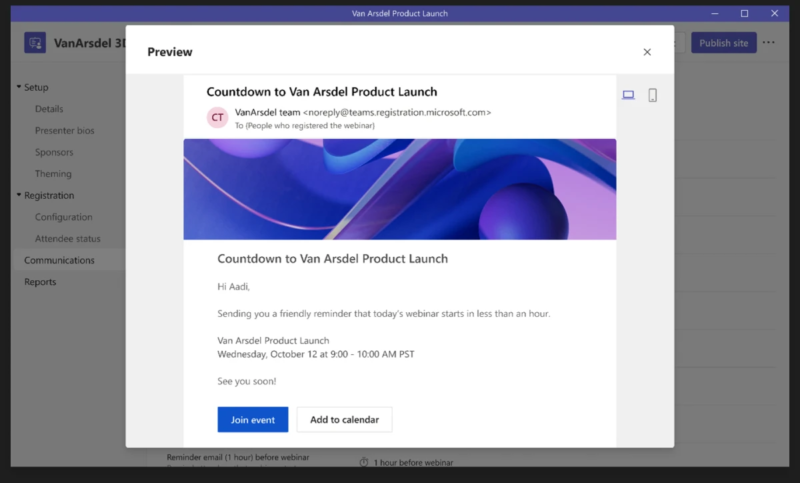
Automation has become invaluable to SMBs looking to cut down on manual processes to save time and money. With Teams’ recent update, you will now be able to automate reminder emails for webinars. To increase the excitement and attendance, users can create custom-branded headers and include webinar details as well as a link to join the event.
New Microsoft Teams-Certified Hardware
Microsoft is hard at work to ensure that SMBs have a diverse list of Teams-certified devices to choose from, and with the recent update the list of certified devices has gotten bigger. Here are a few:
- For the business-minded audiophile, the Bose Videobar VB-S provides crystal clear audio and video for smaller spaces up to 10 x 10 feet.
- Hybrid teams can take advantage of the DTEN D7X 55” video conferencing and collaboration solution which boasts enhanced compute capabilities, touch screen whiteboard technology, and AI-assisted audio optimization.
- SMBs looking to outfit their remote workforce should check out the Lenovo ThinkVision MC60 Monitor Webcam—an intuitive device with smart controls, autofocus features, and innovative audio technology that adjusts the microphone between private and conference modes.
The Best Keeps Getting Better
Microsoft Teams continues to deliver premium support to its users with regular updates and an ever-expanding catalog of certified devices. Whether you are a long-time user of Teams or are considering migrating to the collaboration platform, now has never been a better time to be a part of the Microsoft Teams ecosystem. Contact Point Alliance today to learn more.





